一、前言
在我们平时玩单机游戏卡关时,常常会在社区或群里找各种修改器或开挂软件。用来给血条蓝条加量,或者修改技能或武器,而这些工具其实都是通过修改游戏运行时的内存实现的。
所以,既为了学习C语言,也为了玩一下CE修改器,就本地用visual studio跑一个内存修改的程序。以java常驻内存为例,然后用CE扫描该java进程中指定值的内存地址,最后运行C程序修改内存的值。
二、开始操作
1.Java代码
1
2
3
4
5
6
7
8
9
10
11
12
13
14
15
16
17
18
19
20
21
22
23
24
25
26
27
28
29
30
31
32
33
34
35
36
37
38
39
40
41
42
43
44
45
46
47
48
49
50
| public class MemoryOpera {
public static String playerName = "InitialName";
public static int playerHealth = 3598797;
public static void main(String[] args) throws Exception {
int currentHealth = 7891;
Uitls tools = new Uitls();
int num = tools.computerData();
System.out.println("Player: " + playerName + ", Health: " + playerHealth + ", CurHealth:" + num);
while (true) {
Thread.sleep(1000);
System.out.println("[Running] Player: " + playerName + ", Health: " + playerHealth + ", CurHealth:" + num);
}
}
}
class Uitls
{
public int computerData()
{
int startNum = 3598200;
int endNum = 3598202;
int totalNum = startNum + endNum;
return totalNum;
}
}
|
2.编译Java程序
1
| javac -encoding UTF-8 MemoryOpera.java
|
3.运行Java程序
4.查看程序进程ID
1
| tasklist | findstr "java"
|
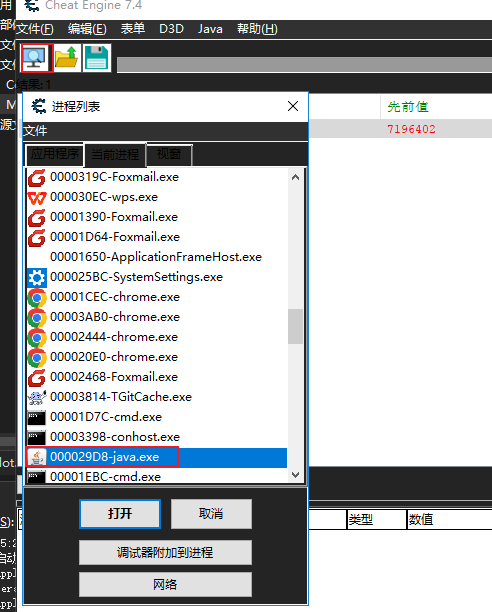
5.Cheat Engine打开Java进程
如果在进程列表中不好找,可以右键,选择 “手动输入PID” 或者过滤器,前者就把上面的进程ID放进去,后者就输入程序名,都可以筛选,最后打开。
6.查找内存地址
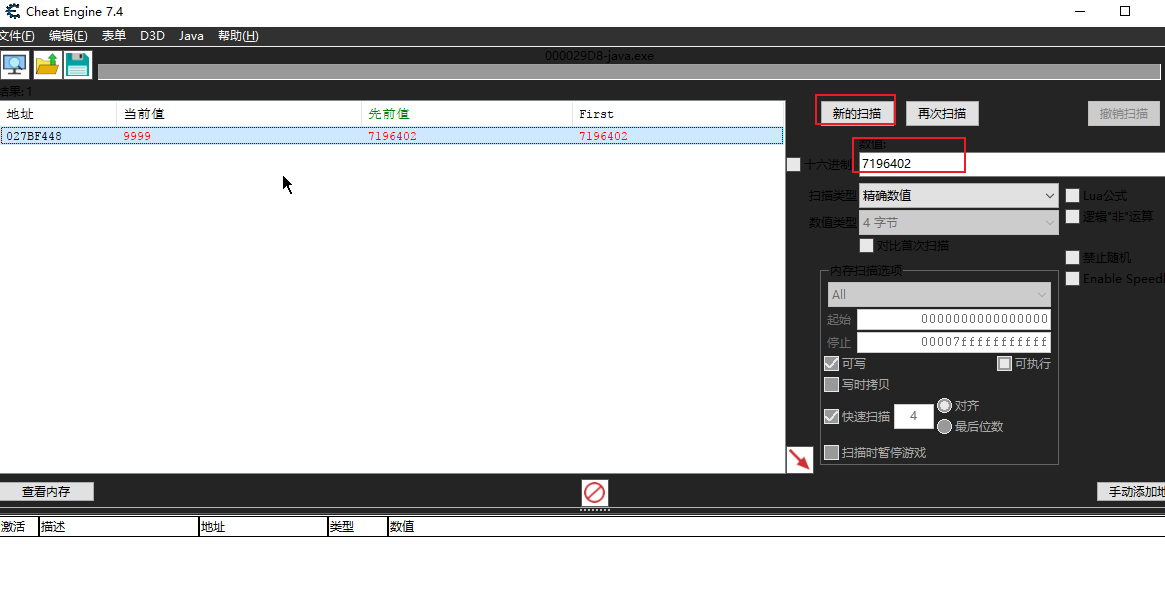
这里主要把程序运行后输出展示的数值粘贴进去,然后点击扫描就可以在结果中看到值对应的地址,最后把内存地址复制出来,当然在CE修改器中也能直接改。
7.创建C程序
1
2
3
4
5
6
7
8
9
10
11
12
13
14
15
16
17
18
19
20
21
22
23
24
25
26
27
28
29
30
31
32
33
34
35
36
37
38
39
40
41
42
43
44
45
46
47
48
49
50
51
52
53
54
| #include <stdio.h>
#include <windows.h>
BOOL write_process_memory(HANDLE process, LPVOID address, LPCVOID data, SIZE_T size) {
SIZE_T bytes_written;
BOOL success = WriteProcessMemory(
process,
address,
data,
size,
&bytes_written
);
if (success && bytes_written == size) {
printf("成功写入 %zu 字节到地址 %p\n", bytes_written, address);
return TRUE;
}
else {
printf("写入失败! 错误代码: %lu\n", GetLastError());
return FALSE;
}
}
void example_windows() {
DWORD target_pid = 10712;
uintptr_t target_address = 0x027BF448;
int new_value = 9999;
HANDLE hProcess = OpenProcess(
PROCESS_VM_WRITE | PROCESS_VM_OPERATION,
FALSE,
target_pid
);
if (hProcess == NULL) {
printf("无法打开进程! 错误代码: %lu\n", GetLastError());
return;
}
write_process_memory(hProcess, (LPVOID)target_address, &new_value, sizeof(new_value));
CloseHandle(hProcess);
}
int main() {
example_windows();
return 0;
}
|
8.运行程序
在visual studio中创建的C++控制台程序,把上面代码复制过来,然后修改里面的进程ID,内存地址,修改值,最后点击运行按钮就直接编译运行了。
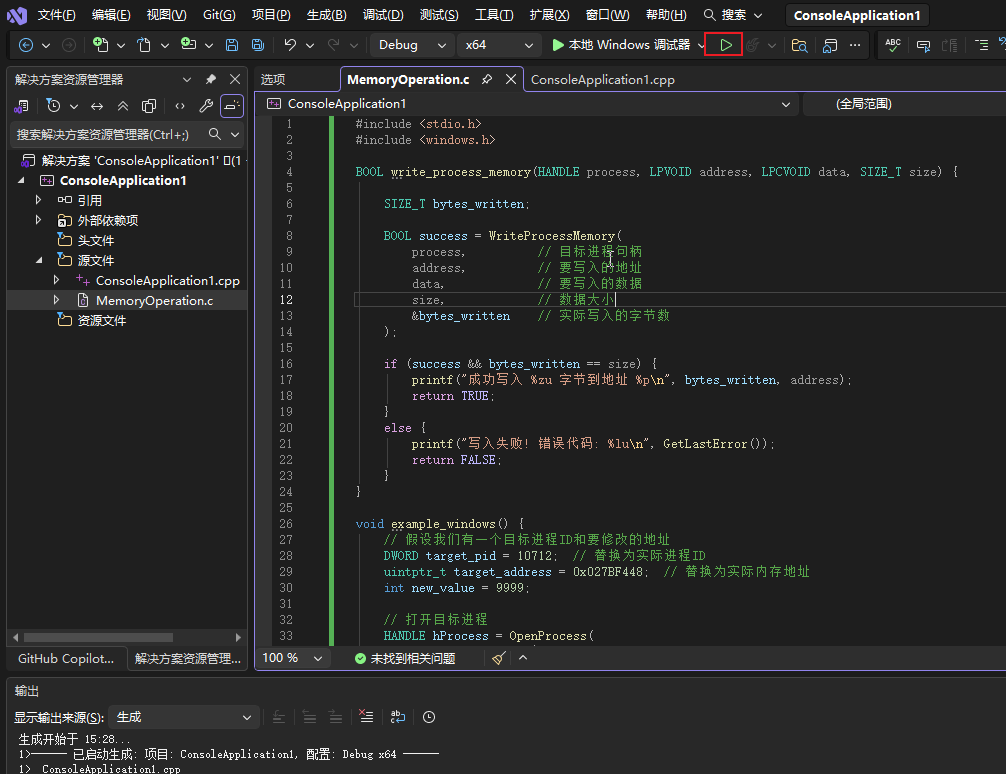
最后再回到Java运行的控制面板,发现里面不断输出的那个数值就被修改了。


 微信
微信 支付宝
支付宝